gvSIG bugs #2564

"Apply a transform" (Create join) wizard issue
| Status: | Closed | % Done: | 0% | |
|---|---|---|---|---|
| Priority: | High | Spent time: | - | |
| Assignee: |  José Badía José Badía | |||
| Category: | Document table | |||
| Target version: | 2.2.0-2302 (rev. org.gvsig.desktop-2.0.89) | |||
| Severity: | Major | Add-on version: | ||
| gvSIG version: | 2.1.0 | Add-on build: | ||
| gvSIG build: | 2228 | Add-on resolve version: | ||
| Operative System: | Windows | Add-on resolve build: | ||
| Keywords: | join, transformation, wizard | Proyecto: | ||
| Has patch: | No | Hito: | ||
| Add-on name: | Unknown |
Description
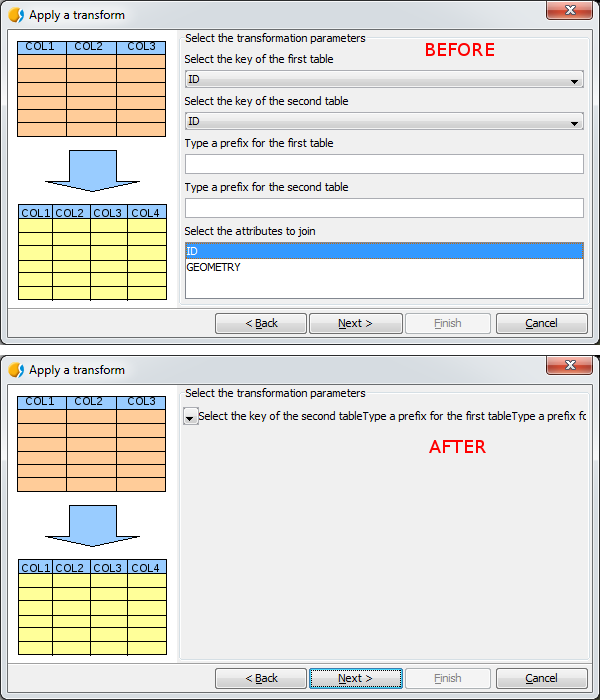
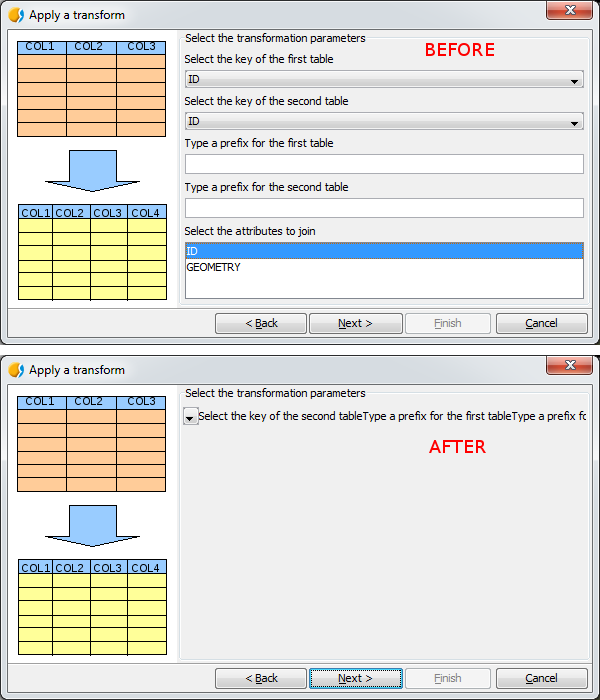
If I try to create a join between two tables, comboboxes and textboxes collapse in one row in the "Apply a transform" wizard after clicking on the "Back" button.
Steps in order to reproduce this bug:
Steps in order to reproduce this bug:
- add two vector layers with a common field in their attribute tables;
- click on the "Create join" button;
- choose the first data store and click on the "Next" button;
- choose the second data store and click on the "Next" button;
- select the transformation parameters and then click on the "Next" button (see BEFORE image in the screenshot);
- click on the "Back" button and the issue happens (see AFTER image in the screenshot).
create_join_wizard_bn2228.png - "Apply a transform" wizard (before and after the issue) (43.3 KB)
gvSIG.log (461 KB)
Associated revisions
fixes #2564
"Apply a transform" (Create join) wizard issue
History
#1
 Updated by Álvaro Anguix about 11 years ago
- Target version set to 2.2.0-2311-rc2
- Assignee set to José Badía
#2
 Updated by José Badía about 11 years ago
- Status changed from New to Fixed
#3
 Updated by Joaquín del Cerro Murciano about 11 years ago
- Target version changed from 2.2.0-2311-rc2 to 2.2.0-2302 (rev. org.gvsig.desktop-2.0.89)
#4
Updated by Álvaro Anguix about 11 years ago
- Status changed from Fixed to Closed